
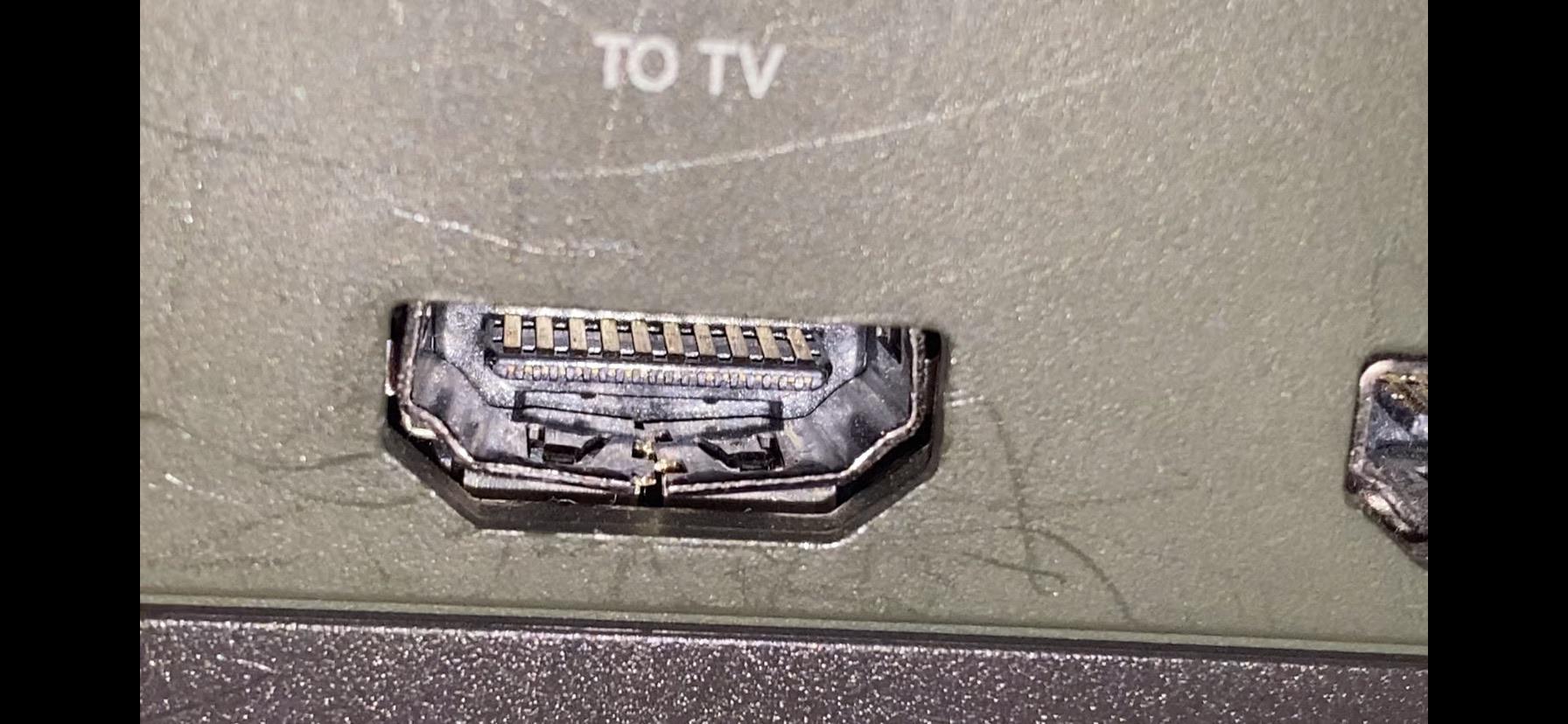
If your Xbox turns on but your TV shows “No Signal”, the HDMI port is one of the most likely causes. But before sending it for repair, it’s important to properly test it and rule out simple issues.
In this guide, you’ll learn how to test your Xbox HDMI port step-by-step — and how to know when it’s time for professional repair.
🧪 Step 1: Test with a Different HDMI Cable
Start with the easiest fix.
What to do:
- Use a known working HDMI cable
- Avoid damaged or cheap cables
What to look for:
- If the image appears → the cable was the problem
- If still no signal → move to next step
👉 This simple test solves a surprising number of cases
📺 Step 2: Try a Different TV or Monitor
Now rule out display issues.
What to do:
- Connect your Xbox to another TV or monitor
- Try different HDMI ports on the TV
Results:
- Works on another screen → issue is your TV
- Still no signal → likely Xbox-related
🔌 Step 3: Check the Correct Input Source
Sometimes the issue is very simple.
Make sure:
- You selected the correct HDMI input
- TV is not stuck on another source
🔍 Step 4: Inspect the HDMI Port (Very Important)
Use a flashlight and look inside the port.
Check for:
- Bent or missing pins
- Dirt or debris
- Port pushed in or misaligned
👉 If you see physical damage, the port will need replacement
⚠️ Step 5: Perform the “Wiggle Test”
Plug in the HDMI cable and gently move it.
Watch for:
- Signal appearing/disappearing
- Screen flickering
- Image cutting in and out
What it means:
- Loose port
- Broken solder joints
- Internal connection damage
👉 This is one of the clearest signs of HDMI port failure
🧠 Step 6: Test for Hidden Internal Issues
Sometimes everything looks fine — but still no signal.
Possible causes:
- HDMI retimer chip failure
- Broken traces on the motherboard
- Power issues in the HDMI circuit
👉 These issues require board-level diagnostics
❗ When Testing Isn’t Enough
If you’ve completed all steps and still have:
- No signal
- Intermittent display
- Loose HDMI connection
👉 The problem is almost certainly hardware-related
🛠️ What NOT to Do
Avoid these common mistakes:
❌ Forcing the HDMI cable
❌ Trying to bend pins back
❌ Heating the board
❌ Attempting repair without tools
👉 These often make the damage worse
💰 Is It Worth Repairing?
In most cases — yes.
- HDMI repair is much cheaper than replacing the console
- Most issues are fixable
👉 Learn more about pricing here:
https://zapfixers.com/xbox-hdmi-repair-cost-is-it-worth-it/
📦 Professional Xbox HDMI Repair
If your tests confirm a hardware issue, professional repair is the next step.
👉 General HDMI repair service:
https://zapfixers.com/services/xbox-hdmi-repair/
🎮 Model-specific services:
👉 Xbox Series X HDMI repair:
https://zapfixers.com/services/xbox-series-x-hdmi-repair/
👉 Xbox Series S HDMI repair:
https://zapfixers.com/services/xbox-series-s-hdmi-repair/
What we fix:
- HDMI port replacement
- Ripped pads and broken traces
- HDMI IC (retimer chip) issues
👉 We perform full board-level diagnostics, not just simple replacements
🔥 Final Thoughts
Testing your Xbox HDMI port is the first step to solving “No Signal” issues.
Quick recap:
- Test cable
- Test display
- Check input
- Inspect port
- Wiggle test
- Consider internal damage
👉 If all tests fail, it’s time for repair
👉 Need Help?
If your Xbox HDMI port is not working, we’re here to help.
✅ Nationwide mail-in service
✅ Board-level repair
✅ Fast turnaround
👉 Start your repair today:
https://zapfixers.com/services/xbox-hdmi-repair/
