
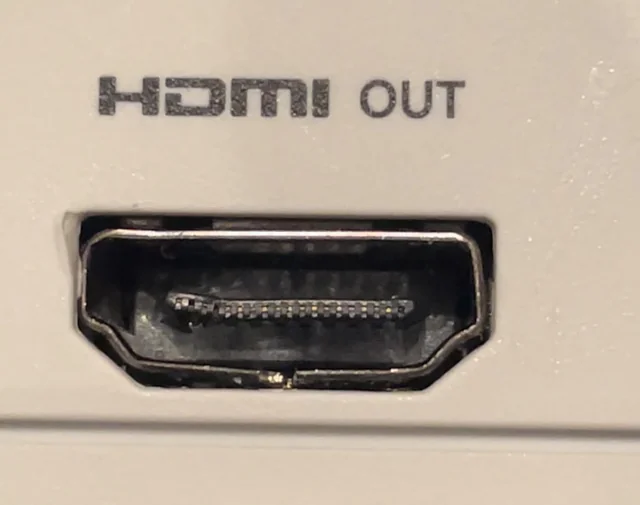
If your Xbox turns on but your TV shows “No Signal”, you’re not alone. This is one of the most common issues we see — and in many cases, it’s caused by a damaged HDMI port or internal hardware problem.
In this guide, we’ll walk you through:
- How to diagnose the issue
- What actually causes it
- When it’s an easy fix vs. when you need repair
🔍 Why Your Xbox Says “No Signal”
Before assuming the worst, it’s important to understand that “no signal” doesn’t always mean a broken console.
The most common causes:
- Faulty HDMI cable
- Wrong TV input
- Damaged HDMI port
- Broken HDMI retimer chip
- Internal motherboard damage
👉 The key is identifying whether the problem is external (easy fix) or hardware-related (needs repair)
🧪 Step-by-Step: How to Diagnose the Problem
Follow these steps in order:
1. Try a Different HDMI Cable
HDMI cables fail more often than people think.
- Use a known working cable
- Avoid very cheap or damaged cables
👉 If it works → problem solved
2. Try Another TV or Monitor
This helps rule out display issues.
- Plug your Xbox into a different screen
- Try a different HDMI port on the TV
👉 If still no signal → continue
3. Check the HDMI Input on Your TV
Make sure:
- Correct input is selected
- No loose connection
4. Inspect the HDMI Port on Your Xbox
Use a flashlight and look inside the port.
Signs of damage:
- Bent or missing pins
- Dirt or debris
- Port looks pushed in or crooked
👉 If you see any of these → the port is likely damaged
5. The “Wiggle Test”
Plug in the HDMI cable and gently move it.
- If signal appears/disappears → loose port
- If nothing changes → deeper issue
⚠️ Don’t force it — you can make it worse
⚠️ Common Signs Your HDMI Port Is Broken
If you notice any of these, the HDMI port likely needs replacement:
- Xbox turns on but no display
- HDMI cable feels loose
- Image cuts in and out
- Works only at certain angles
- No signal on multiple TVs
👉 These are classic signs of physical port damage
🔧 Hidden Problems (When Port Looks Fine)
Sometimes the HDMI port looks perfect — but still no signal.
This is where many people get confused.
Possible internal issues:
1. HDMI Retimer Chip Failure
This chip controls the video signal.
- If it fails → no signal even with good port
- Common on newer Xbox models
2. Broken Traces on the Motherboard
Even if the port is intact:
- Internal signal lines may be damaged
- Usually caused by drops or stress
3. Power Issues on HDMI Circuit
- Missing voltage to HDMI chip
- Shorted components
👉 These problems require board-level diagnostics
🛠️ Can You Fix It Yourself?
Simple fixes you can try:
- Cleaning the port (carefully)
- Replacing HDMI cable
What you should NOT try:
- Replacing the HDMI port without tools
- Heating the board
- Forcing the cable
👉 HDMI repair requires:
- Microsoldering
- Proper equipment
- Experience
Otherwise, you can cause:
- Ripped pads
- Permanent motherboard damage
💰 Is Xbox HDMI Repair Worth It?
In most cases — yes.
Typical repair cost:
- $100–$200 depending on damage
Worth repairing if:
- Console powers on
- No major board damage
Not worth it if:
- Severe internal damage
- Multiple failed components
👉 Repair is usually much cheaper than buying a new console
📦 Professional Xbox HDMI Repair (Mail-In Service)
At ZapFixers, we repair HDMI issues at board level, not just simple replacements.
What we do:
- HDMI port replacement
- Trace repair (when pads are ripped)
- HDMI retimer chip diagnostics
- Full stress testing
Why it matters:
Many shops only replace the port —
we fix the actual root cause
Our process:
- Fill out repair form
- Ship your Xbox
- We diagnose and repair
- Full testing under load
- Ship it back to you
👉 Nationwide mail-in service available
❗ When to Stop DIY and Send for Repair
You should stop troubleshooting if:
- You see bent pins
- Port is loose
- No signal after all tests
- Issue comes and goes
👉 Continuing DIY attempts can make repair harder (or impossible)
🔥 Final Thoughts
“No signal” issues can range from simple fixes to complex hardware failures.
The key is:
- Diagnose correctly
- Avoid damaging the board
- Repair it properly
👉 Need Help?
If your Xbox HDMI port is not working, we can help.
✅ Fast turnaround
✅ Board-level repair
✅ Mail-in service across the U.S.
👉 Start your repair here:
https://zapfixers.com/services/xbox-hdmi-repair/
❓ Xbox HDMI Repair – Frequently Asked Questions
Common signs include:
No signal on the TV
HDMI cable feels loose
Image cuts in and out
Works only when cable is held at an angle
If you notice these, the HDMI port is very likely damaged and needs repair.
This usually happens due to:
A damaged HDMI port
A faulty HDMI cable
HDMI retimer chip failure
Internal motherboard damage
Start by testing another cable and TV. If the issue persists, it’s likely a hardware problem.
Most HDMI repairs typically range between:
$99 – $200, depending on the issue
Simple port replacements are cheaper, while board-level repairs (like trace or chip repair) may cost more.
Typical turnaround time:
2–3 weeks standard service
Expedited service may be available
This depends on the severity of the damage and parts availability.
In most cases, no.
HDMI port repair requires:
Microsoldering tools
Experience working with multilayer boards
DIY attempts often lead to:
Ripped pads
Additional motherboard damage
If the port looks undamaged, the issue may be:
HDMI retimer chip failure
Broken internal traces
Power issues on the HDMI circuit
These require professional board-level diagnostics.
Yes, absolutely.
Before assuming hardware damage:
Try a different HDMI cable
Test with another display
This is the easiest issue to rule out.
The most common causes include:
Frequent plugging/unplugging
Pulling or stressing the cable
Accidental drops
Dust or debris inside the port
HDMI ports are mechanically fragile components.
Yes.
We provide nationwide mail-in repair service:
Fill out the repair form
Ship your Xbox to us
We diagnose and repair
Ship it back after testing
We go beyond simple replacements.
Our service includes:
HDMI port replacement
Trace and pad repair
HDMI retimer chip diagnostics
Full board-level repair
We repair HDMI issues on all models:
Xbox Series X
Xbox Series S
Xbox One
Xbox One S
Xbox One X
No, HDMI repair does not affect your data.
We do not access or modify your storage — your games and files remain safe.
No.
Please send:
Console only
Keep:
HDMI cables
Power cords
Controllers
In most cases, yes.
Repair is usually:
Much cheaper than buying a new console
Faster than replacing the system
Good for environment
